"Iron" (My weights): your best score in every strength and weightlifting movement, organised by muscle group, with a video for each exercise, RM calculator and your box's ranking.
Strength
Iron
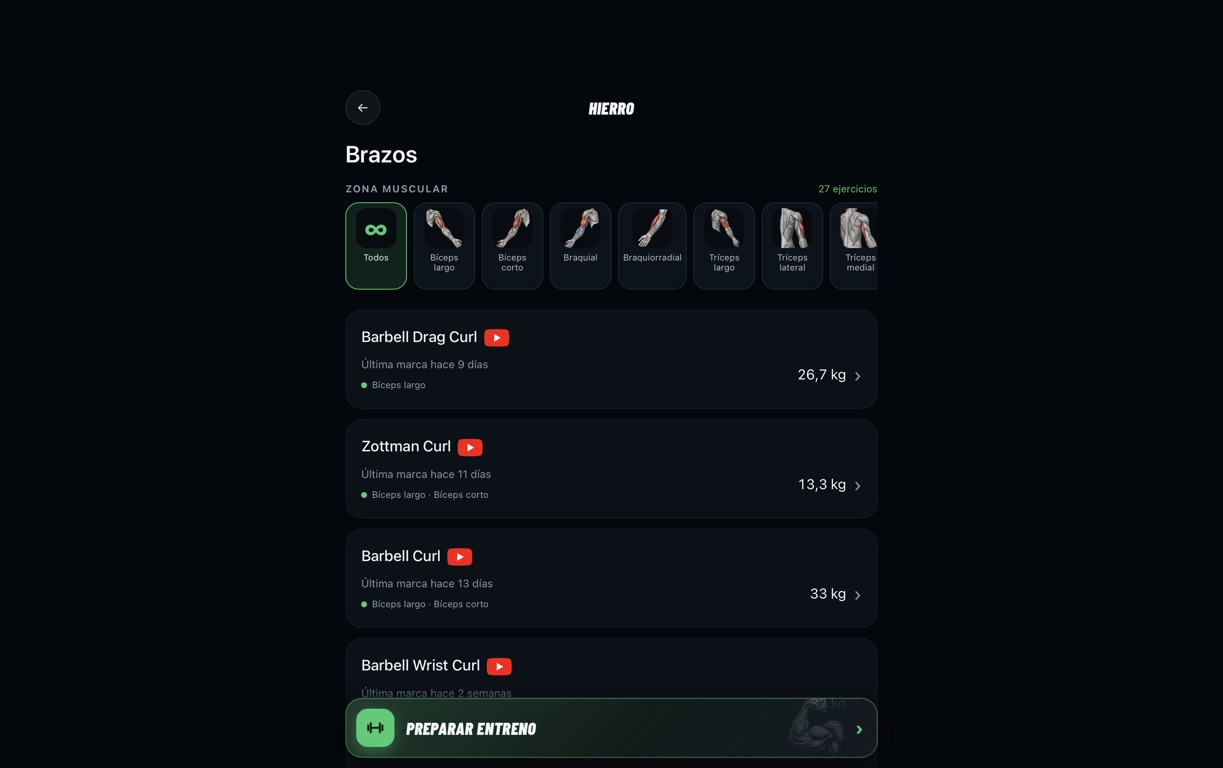
Reaching an exercise
- Choose a group: Weightlifting or a muscle group (Arms, Shoulders, Back, Legs, Chest...).
- Each row shows the exercise, your latest score (in kg or lb per your profile) and when you did it; those with no score appear as "No score".
- Tap an exercise to expand it: its video and its three tabs open.
Within each group, muscle illustrations let you filter by area. Expand a card to view the video and your RM, log a record and see your progress.
Train by muscle group
- In Iron, tap "Train by muscle group" and select at least two muscle groups. Olympic weightlifting is excluded from this selection.
- Tap "Generate workout" and choose 65, 70, 75 or 80% of RM. You can also prepare a session from a single muscle group.
- Review the exercises, add any missing records and follow the sets and rests. The displayed duration is an estimate.
The three tabs
Score
Your current 1RM (real or estimated) with the date, and the form to log a new one: weight lifted, reps and date. Below, the calculator shows you the resulting 1RM before saving.
% Table
Table with percentages of your RM, from 100 % downwards, already converted to weight: useful to know what to load for each set.
Box
Ranking of that exercise among the people in your box.
With 1 rep the score is saved as a real 1RM. With 2 or more, the app calculates an estimated 1RM (Epley formula). These are the scores "My plan" uses to calculate the kilos of each set, and the ones you can share in the World Ranking.